Step 1: Check the Aircraft Layout Before Booking a Window Seat
The best way to avoid a window seat with no view is to check the aircraft layout before choosing a seat. The same seat number can sit beside a window on one aircraft and a cabin wall on another. This guide shows how to check the layout and seat position before boarding.
A window seat is a seat beside the airplane’s cabin wall with a window nearby, but the seat label alone does not promise a clear view. Start with the aircraft type shown during flight booking, then check the airline’s seat map for that aircraft. Aircraft layouts can change, so treat the map as a guide, not a guarantee.
Look for signs of a wing obstruction or a row near a door. A common mistake is picking a seat by row number without checking the aircraft configuration.
- Check the aircraft type on your booking.
- Open the airline’s seat map.
- Recheck the map if your aircraft changes.
For another way to spot blocked views, read our guide to avoiding bad airplane seat views. The practical rule is simple: choose by position, not by the promise of a window-seat label.
Step 2: Use Seat Map Alignment Tools to Spot Misaligned Windows
Use a seat-map database to check the exact seat number against the aircraft and cabin shown on your itinerary, then confirm the assignment in the airline’s own seat map. AeroLOPA publishes detailed cabin layouts for many airlines, while SeatMaps.com provides searchable seat maps and traveler feedback for many aircraft. Coverage varies, so treat either resource as a cross-check rather than a guarantee.
A reliable check takes a few minutes:
- Record the aircraft and cabin. Note the aircraft family and variant shown in your reservation, such as a Boeing 737-800 or Airbus A320, along with the cabin. A family name alone may not identify the exact layout.
- Find the matching layout. Search the database by airline and aircraft variant. Compare the row numbers and seat letters with your booking; do not rely on a map for a different airline or cabin configuration.
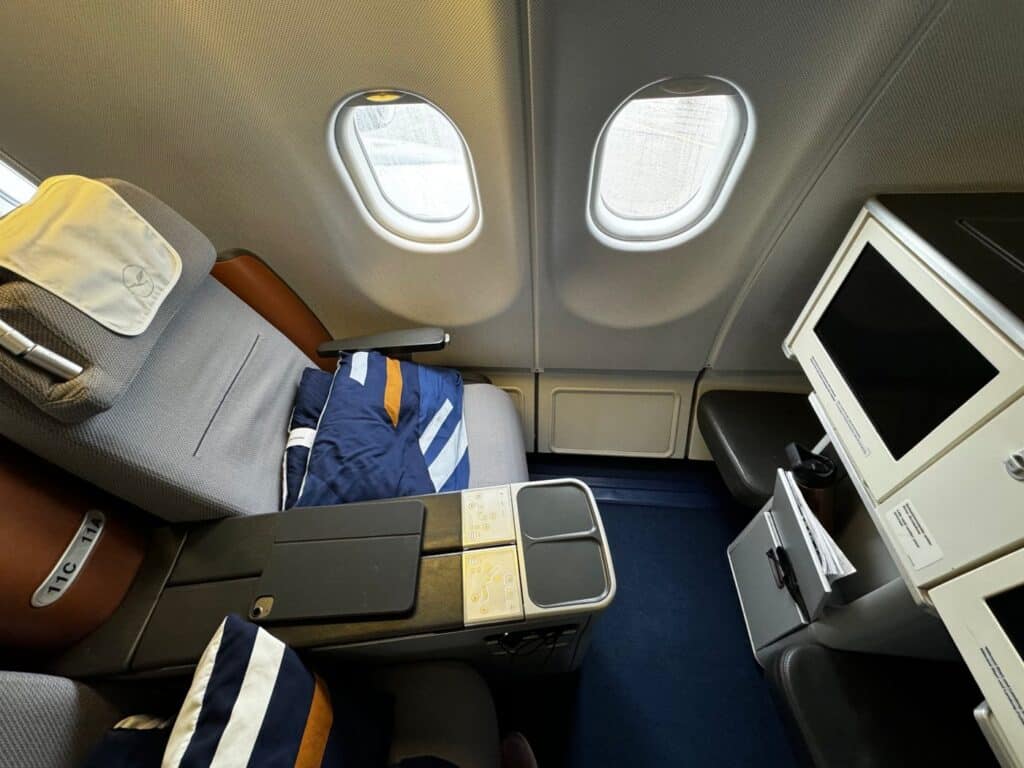
- Inspect the seat’s position. Look for the window markers in relation to the seat row. If the seat appears between window positions, or the nearest window is notably ahead of or behind the seat, choose another row when practical.
- Check the surrounding structure. Note the wing, doors, and exit rows. These can affect the view or the window’s position, and an exit-row seat is not automatically better aligned.
- Confirm on the airline site before selecting. The airline’s seat map is the source for your current assignment and availability; third-party maps are useful for interpreting the layout, not for confirming inventory.
The key distinction is between a seat map that shows where seats are and a cabin diagram that helps you judge where windows fall. Some databases show seat rows clearly but do not provide precise window positions, so use cabin photos or recent seat reports as a second check when alignment is uncertain.
Watch out: The aircraft listed when you book can change before departure, and a replacement aircraft may use a different cabin layout even when the seat number stays the same. Recheck the aircraft and seat map after a schedule or equipment change.
For a broader look at cabin geometry, use our guide to seat map alignment.
Use these checks to compare your assigned seat with the aircraft layout.
Step | What to do | When |
|---|---|---|
Record aircraft and cabin | Note the aircraft family, variant, and cabin | Before searching |
Find matching layout | Compare row numbers and seat letters | Before choosing |
Inspect seat position | Check window markers against the seat row | Before selecting |
Check surrounding structure | Note the wing, doors, and exit rows | During layout review |
Confirm airline seat map | Verify assignment and availability | Before selecting |
Step 3: Verify the Window Position for Your Specific Seat
Before you commit to a window seat, compare the exact row and seat letter with a cabin photo or a seat report for the same airline and aircraft variant. The useful question is not simply whether a window exists in that row; it is whether the window is close to the seat’s position and whether the wing or a structural area dominates the view.
Use this visual checklist:
- Match the aircraft variant, not just the family. A 737-800 and a 737 MAX 8 are both 737s, but their cabin layouts and seat maps may differ. The same caution applies when comparing A320-family aircraft. Confirm the variant shown in your booking and look for a matching layout or report.
- Compare row numbers and seat letters. A photo labeled only with an airline name is weak evidence. Look for the row number, seat letter, and aircraft details, then compare them with your assignment.
- Check the window against the seatback. In a cabin photo, note whether the window is centered near the seat or falls noticeably forward or behind it. A seat can be sold as a window seat even when the alignment is awkward.
- Locate the wing and exits. If the wing crosses the window area in the photo or diagram, expect a more obstructed view. Rows near doors or exit areas can also have unusual spacing or alignment.
- Look for more than one recent report. A single photo may show a different cabin refresh or aircraft configuration. Give more weight to reports that identify the aircraft, row, and seat and agree with the seat map.
For example, if your itinerary lists an A320-family aircraft, do not assume a photo from another airline’s A320 shows your cabin. Search the operating airline, aircraft variant, and row together; then compare the result with the airline’s current seat map. Repeat the same process for a 737 rather than treating every 737 layout as interchangeable.
Watch out: Seat-review photos can be mislabeled or out of date, and airlines may substitute aircraft. If the evidence does not match your exact variant and row, treat it as a clue, not confirmation, and recheck after any equipment change.
If you cannot verify the alignment, choose a different window row with clearer evidence rather than relying on the seat label alone.
Step 4: Choose the Best Economy Seats for View
The best economy seats for view are usually away from the strongest wing obstruction and beside a window that lines up with the seat. No single row works on every aircraft, so use the seat map and seat reviews together. For window-seat fans, a clear view matters more than a row that simply looks good on paper.
The exit row can offer different seat pitch, but it is not automatically the best choice for a view. The wing may still block the scene, and the window can sit in an awkward spot. Basic economy may also limit seat selection, so check what your fare allows before booking.
- Choose a row ahead of or behind the wing when possible.
- Check premium economy separately; its layout may differ.
- Avoid assuming an aisle or middle seat can be changed later.
- Look for the shady side on daytime flights to reduce sun glare.
For more seat-picking advice, see our best window seat guide. The real difference between a good and poor view often comes down to aircraft layout, not cabin class.
Step 5: Check Seat Reviews and Airline Seat-Change Policies
Seat reviews can confirm whether a window seat has a clear view, while airline seat-change policies explain what options remain after booking. Check both before choosing a seat. Policies vary by airline and fare, so read the current terms tied to your booking.
Search reviews by aircraft type, row, and seat number. A review for a different aircraft configuration may not apply, even on the same route. Then check whether your fare allows seat selection or changes.
- Save the aircraft type and seat number.
- Read recent reviews for that exact layout.
- Check the airline’s seat-change rules.
- Keep a backup row in mind.
A common mistake is relying on an old review after an aircraft swap. If the seat assignment changes, repeat the check. Our guide to requesting a window seat at check-in covers what to ask and when.
Step 6: Ask the Gate Agent About a Better Window Seat
Ask the gate agent politely whether another window seat is open if your assigned seat has a blocked view. Keep the request specific: name your current seat and ask whether a clear-window option is available. The agent cannot promise a change, but a clear request makes the issue easy to understand.
Try this short script:
“Hi, my seat is [seat number] on [aircraft type]. If a window seat with a clearer view opens, could you please let me know?”
Ask before boarding starts if you can, and keep your boarding pass ready. Do not assume an empty seat is available; it may be held for another traveler or assigned at the gate.
Step 7: Confirm Your Seat Before You Board
Confirm your seat assignment after any aircraft change and before you board. Check the boarding pass against the airline app or gate display, then compare the row with the updated seat map. A last-minute aircraft swap can change the layout and your window position.
Use this final check:
- Confirm the aircraft type and seat number.
- Reopen the seat map after a change.
- Ask the gate agent if the window looks misaligned.
- Board with a backup plan if no better seat is open.
No method can guarantee a clear view, but checking each detail cuts down on guesswork. At Plan0gram, we focus on practical advice for window-seat travelers, backed by Tony Yandow’s more than 34 years of flying experience.
A blocked view can spoil a window seat, especially when the aircraft changes late. Plan0gram’s airport guides, gear reviews, and window-seat advice help you plan with more confidence. Get started with Plan0gram and make your next seat choice with a clearer view in mind.