

Best Trackers for Luggage Location in 2026
Best luggage trackers for airport success: compare real Bluetooth and GPS options, TSA/FAA battery rules, and how to actually recover a lost bag.
As an Amazon Associate, Plan0gram earns from qualifying purchases made through links on this page.
Why Trackers are mandatory for Success at the airports Today
Losing a checked bag at the airport ranks among the most stressful travel experiences. You land, head to baggage claim, and your suitcase never appears.
I’ve had this happen more than once. On a river cruise, the transfer bus broke down mid-tour, and three or four bags — including mine — never made it onto the replacement bus. We ended up taking an Uber straight to the bus repair shop just to climb back onto the original bus and grab our bags. Another time, my car keys fell out of my backpack when a driver pulled it out of his truck upside-down — language barrier and all, it took someone flagging me down before I even realized something had been left behind. Neither time was a tracker’s fault, but both times reminded me that the feature that actually matters when things go sideways isn’t the app or the range — it’s whether you can swap a dead battery in five seconds instead of being stuck with a tracker that’s gone dark right when you need it.
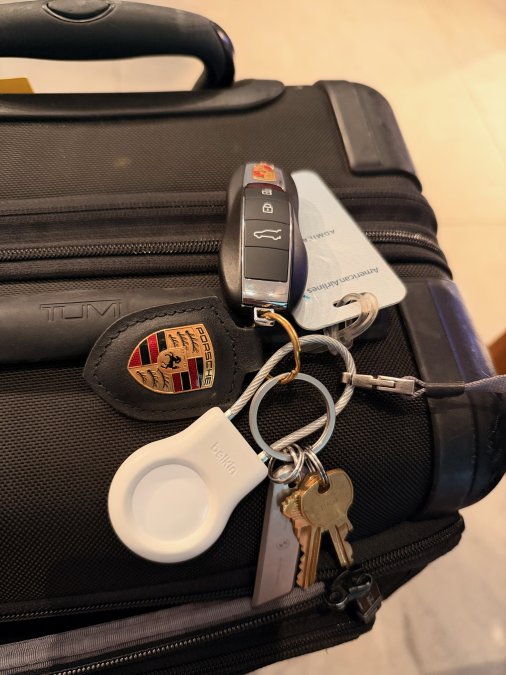
The AirTag from the table above, riding in a Belkin holder on my own keys — the setup that would’ve saved me the “someone flagging me down” moment.
A quality luggage tracker gives you real-time visibility into your bag’s location from departure gate to final destination. The best luggage trackers for airport navigation combine Bluetooth, GPS, and crowdsourced networks to pinpoint your bag’s location and give you actionable information when your bag goes missing.
Best Luggage Trackers to Buy in 2026
Here’s what I’d actually put in a bag, based on how each one performs for the Bluetooth-vs-GPS tradeoffs covered below.
Tracker | Best For | Network | Price | Buy |
|---|---|---|---|---|
Apple AirTag | iPhone users, domestic flights | Apple Find My (huge network) | ~$29 | |
Samsung SmartTag2 | Android/Galaxy users | Samsung Find (Galaxy network) | ~$30 | |
Tile Pro | Cross-platform (iOS + Android) | Tile network | ~$35 | |
Chipolo ONE Spot | Slim bags/backpacks, Apple Find My compatible | Apple Find My | ~$28 | |
LandAirSea 54 | True GPS, international/checked bags | Cellular GPS (subscription) | ~$30 + monthly fee |
Bluetooth options (AirTag, SmartTag2, Tile, Chipolo) rely on other users’ phones nearby to relay location — great near baggage claim in a busy hub, weaker once a bag leaves the terminal. The LandAirSea 54 is real GPS with its own cellular connection, so it keeps reporting location even when your bag is nowhere near another phone — the right call for international connections or any routing you don’t fully trust.
One thing worth knowing if you go with the AirTag: it doesn’t come with any built-in way to attach to a keyring or bag zipper on its own. I use a Belkin Secure Holder on my own car keys for exactly that reason — mine kept ending up loose in the bottom of a bag until I clipped one on. It holds the AirTag snugly, has an actual keyring loop, and makes the whole thing easier to find on a crowded bag or key chain in the first place.
Bluetooth vs GPS Luggage Trackers: What’s the Difference
Bluetooth trackers use low-energy wireless signals over 30-100 feet and work best within airport terminals. GPS trackers use satellite positioning for global coverage but drain batteries much faster.
Bluetooth trackers work best for finding bags within airport terminals. If your bag gets lost in the baggage system at a hub airport like ORD or ATL, a Bluetooth tracker (like the AirTag or SmartTag2 above) helps you locate it quickly. The trade-off: Bluetooth range is limited for bags routed to different cities.
GPS trackers provide global positioning but drain batteries faster and often require cellular data plans, adding ongoing expenses — the LandAirSea 54 above is the clearest example of this tradeoff done right.
Many travelers find a hybrid approach works best: Bluetooth for domestic flights, GPS for international trips where bags transfer between multiple hubs. The best luggage trackers for airport navigation combine both technologies with crowdsourced networks, meaning other users’ devices help locate your bag.
Check your specific airport’s baggage handling procedures before purchasing. Major hubs like LAX, JFK, and DEN have different systems for tracking and locating misrouted bags. Knowing your airport’s process helps you choose the right tracker type.
TSA Luggage Tracker Regulations and Airline Policies
Before buying any luggage tracker, understand TSA, FAA, and airline policies, as lithium battery regulations directly impact which trackers you can legally pack in checked baggage.
FAA Lithium Battery Requirements for Checked Luggage
The FAA prohibits lithium batteries exceeding 100 watt-hours (Wh) in checked baggage. Most consumer luggage trackers — including all five listed above — use batteries well under 5 Wh and comply easily, but verify the spec sheet before packing. Non-rechargeable lithium batteries are prohibited entirely in checked bags. Always use rechargeable lithium-ion trackers.
For carry-on bags, you can carry two lithium-ion batteries up to 100 Wh each, or one battery up to 160 Wh, provided they are installed in the device itself, not loose in your carry-on.
IATA Compliance for International Flights
For international flights, the International Air Transport Association (IATA) sets additional standards that may exceed FAA requirements. Before booking, contact your airline’s dangerous goods department with the tracker’s exact battery specifications.
Airline-Specific Policies on Tracker Integration
Major US carriers officially support third-party luggage trackers and have integrated them into their baggage tracking systems, displaying tracker data on their mobile apps.
Some airlines permit trackers in checked bags if they comply with battery regulations. Before your flight, call your airline’s baggage department with your tracker’s model number and battery specifications to prevent confiscation at the gate.
Some international carriers restrict GPS trackers due to frequency band conflicts. A tracker using 2.4 GHz Bluetooth may work in the US but be incompatible in Japan or the UAE. Verify frequency band compatibility with your destination country’s telecommunications standards.
Documentation You Should Carry
Before traveling, print or screenshot your tracker’s battery specification sheet and carry it in your carry-on bag. If TSA or airline staff question your tracker, you can immediately show them the watt-hour rating and compliance documentation.
Never pack a tracker with a non-rechargeable lithium battery in checked luggage. The FAA prohibits these due to fire risk. Always use rechargeable lithium-ion trackers, and verify the watt-hour rating before packing. Violating this rule can result in your luggage being pulled from the flight and potential fines under federal hazmat regulations.
How to Track Checked Bags at the Airport in Real Time
Pair your tracker with its mobile application at home before arriving at the airport. Once paired, the app displays your tracker’s location on a map and sends notifications when it moves.
When you check your bag, place the tracker inside a front pocket or attach it to the bag’s interior using a secure loop. Avoid exterior pockets where it might get damaged during sorting.
Show Image
Watching an empty carousel is exactly the moment a tracker earns its keep.
At baggage claim, open your tracker’s app and monitor your bag’s location. If your bag doesn’t appear within 15 minutes, the app will show its last known location, either still in the system or diverted to another carousel.
The real-time data helps you communicate with baggage services. Instead of saying “my bag is missing,” you can tell them exactly where your tracker last pinged, which accelerates recovery significantly.
Keep your phone charged during the baggage claim process. Enable airplane mode once you land to preserve battery, then switch to Wi-Fi or cellular data only when checking your tracker. This prevents unnecessary battery drain while waiting for your bag.
Key Features That Matter: Battery Life, Water Resistance, and Geofencing
Three features separate functional luggage trackers from ones that fail when you need them: battery longevity, durability against airport conditions, and geofencing alerts.
Most quality trackers last 7-14 days on a single charge (the AirTag and Chipolo above run closer to a full year on a replaceable coin battery instead), covering typical round-trip flights plus a few days at your destination. Check specifications carefully, as some manufacturers claim extended battery life only when the tracker isn’t actively transmitting.
From experience, a swappable battery matters more than the spec sheet makes it sound. When a bus breaks down mid-tour or a bag ends up in the wrong hands for a few minutes, the last thing you want is a tracker that’s dead and needs an outlet. The AirTag, SmartTag2, and Chipolo ONE Spot all use a replaceable coin battery you can swap in seconds; the Tile Pro and LandAirSea 54 both need an actual charging cable, which is one more thing to remember and one more way to end up with a dead tracker at the worst time.
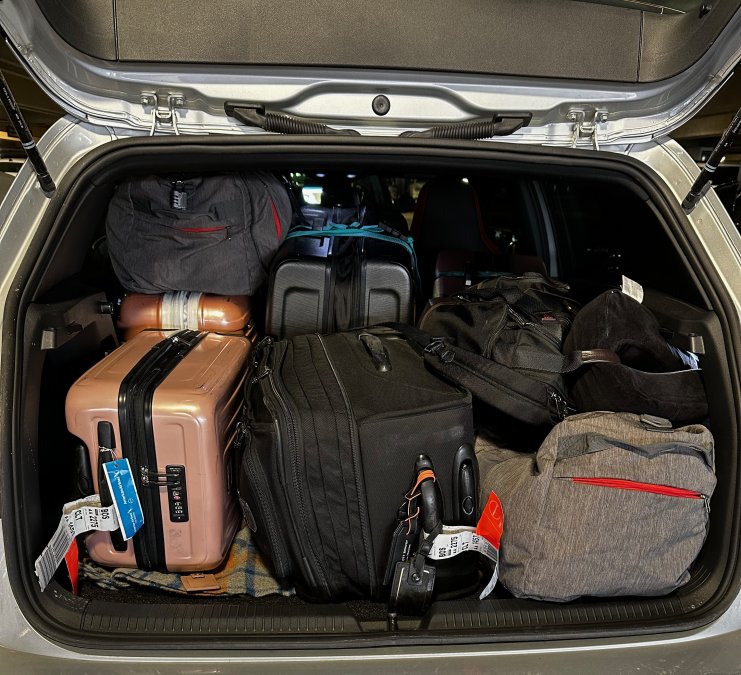
Six bags, six chances for one to go missing — this is the reality trackers are actually solving for.
Water resistance matters significantly. Baggage systems spray bags during sorting and expose them to rain and humidity. A waterproof rating of IP67 or higher ensures your tracker survives these conditions.
Geofencing creates automatic alerts when your bag enters or leaves specific zones. Set a geofence around baggage claim at your destination airport to receive a notification when your bag arrives at the carousel.
Additional features worth considering include proximity alerts and firmware updates. The best luggage trackers for airport navigation include all three core features plus at least one premium option.
Luggage Tracker Setup, Pairing, and Mobile App Integration
Download the tracker’s mobile application before purchasing the physical device to verify compatibility with your phone’s operating system.
When your tracker arrives, charge it fully using the included USB cable. Charging typically takes 1-2 hours.
Open the app and select “Add Device” or “Pair New Tracker.” Enable Bluetooth on your phone and follow the pairing prompts. The process usually completes within 30 seconds.
Once paired, test the tracker’s functionality in your home by walking around to verify the app accurately shows the tracker’s location and that notifications work correctly.
Create custom alerts in the app’s settings, including a geofence around your home airport’s baggage claim area and notifications for when the tracker leaves home and arrives at your destination.
Lost Luggage Recovery: Actionable Steps When Your Bag Goes Missing
When your bag doesn’t appear at baggage claim, your tracker becomes your most valuable asset. Here’s the recovery workflow that accelerates bag recovery.
Step 1: Verify Tracker Data Before Leaving Baggage Claim
Open your tracker app and check your bag’s last known location and timestamp. If the app shows your bag is still in the airport’s baggage system, note the exact location and time of the last update. Take a screenshot of the map.
Step 2: Locate the Airline’s Baggage Service Office
Head straight to the airline’s baggage service desk, usually near baggage claim or just past security in arrivals. If there’s a line, use the wait productively — open your tracker app and confirm your bag’s last recorded location before you reach the counter.
Step 3: Present Tracker Data to Baggage Services Staff
This is where a tracker actually earns its keep. My daughter was relocating to Denver, and one of six checked bags never came off the plane — the staff at baggage claim told us flatly, “no, that’s all of them.” We pulled up the tracker on our phone and showed them the bag was still sitting at the gate. Twenty minutes later, we had it.
What we didn’t get was an apology. Stuff happens, but rather than spend 30 minutes arguing about whose fault it was, airlines would save everyone the trouble by actually looking and listening when a customer shows them exactly where the bag is. Don’t just describe your bag — show the screen. A timestamped location on a map is hard to argue with, and it turns a “that’s everything” brush-off into an actual search.
Step 4: File a Formal Baggage Incident Report
Even if your bag turns up before you leave the airport, file the report anyway if there was ever a real risk of it being lost — it’s the only paper trail that protects you if a “found” bag turns up damaged or missing something later.
Step 5: Communicate with Baggage Services During the Search
Give staff your tracker’s exact last-known location and timestamp, not a general description. Ask for a name and a direct callback number rather than a generic hotline, and check back at set intervals instead of hovering at the counter.
Step 6: Document Everything for Liability Claims
Screenshot your tracker’s map and timestamp the moment you notice a bag is missing, and again once it’s recovered. Keep your baggage claim ticket and incident report number together — airlines have a liability window, and a dated screenshot is the difference between a quick reimbursement and a drawn-out dispute.
Step 7: International Flight Complications
International connections add customs and separate ground-handling companies into the mix, so a bag can technically be “delivered” to the airport without ever reaching the carousel. Confirm with staff whether your bag has cleared customs — a tracker reading “at the airport” doesn’t always mean it’s actually accessible to you yet.
The combination of real-time tracking data plus immediate, specific reporting to airline staff can accelerate lost bag recovery. Don’t wait for the airline to find your bag; use your tracker data to guide their search and provide them with actionable information they can act on immediately.
Conclusion
The best luggage trackers for airport navigation transform how you experience travel. Instead of anxiety at baggage claim, you get real-time visibility into your bag’s location from gate to carousel. At Plan0gram, we understand that airport navigation extends beyond finding your gate, it includes knowing your luggage is where it needs to be. Whether you choose Bluetooth, GPS, or a hybrid approach, the right tracker eliminates uncertainty and accelerates recovery if something goes wrong.